Training Calendar
See your training history laid out week by week — bubble size shows load, color shows intensity. Spot patterns, gaps, and consistency at a glance.
Last updated: Jun 2026
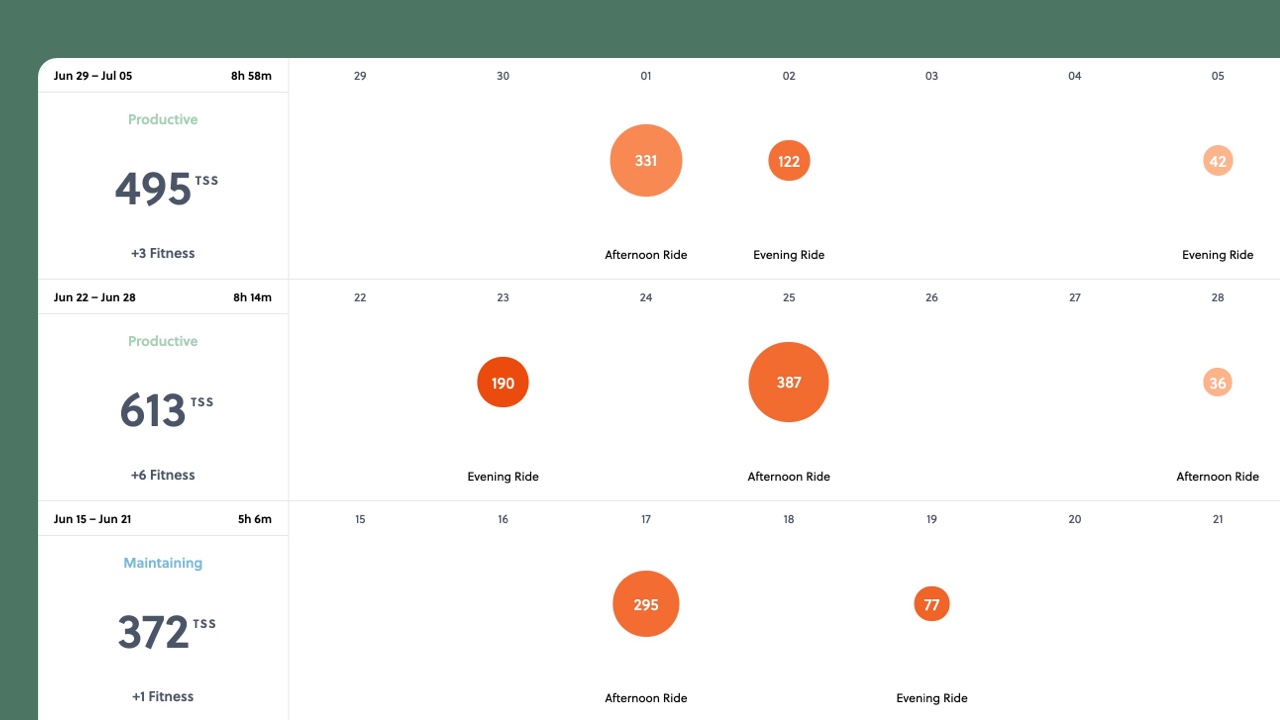
Numbers and charts are great for analysis, but sometimes you just want to see what you've been doing. The Calendar gives you that bird's-eye view — every day, every week, laid out so you can spot patterns at a glance.
How to read it
Each day shows your activities as colored bubbles. Two things are encoded in every bubble:
- Size reflects the training load — bigger bubbles mean more stress on your body that day.
- Color reflects intensity — lighter means easier, deeper orange-to-red means harder effort relative to time spent.
A big, light bubble? That was a long, easy ride. A small, deep red one? Short and intense. You can read the character of your training without opening a single activity.
Weekly summaries
Each row is a week, and the left column shows your weekly totals — training stress, moving time, and your training status for that week. It's the quickest way to see whether your weeks are consistent, building, or all over the place.
Switch what you're looking at
Use the dropdown to change what the bubble size represents: TSS, time, distance, or elevation. Each tells a different story. Switch to distance and you'll see your long rides jump out. Switch to elevation and your climbing weeks stand out. TSS is the default because it captures overall training load regardless of how you spent it.
What patterns to look for
Scroll through a few months and you'll start to notice things:
- Consistency — are most weeks roughly similar, or do you have big gaps followed by overcompensation?
- Intensity balance — if every bubble is deep red, you might not be going easy enough on easy days. A mix of colors is healthy.
- Rest days — are they actually there? Sometimes seeing empty squares is reassuring.
- Building blocks — during a training block, you should see bubbles gradually getting bigger week over week, then shrinking during recovery.
Click any bubble to jump straight to that activity for the full breakdown.
Power Metrics Explained
NP, IF, VI and more